How to Make Internet Explorer your Default Browser so that Netscape does not open:
Find the icon for Internet Explorer, open it,
On the top toolbar click "Tools" and then click "internet options"
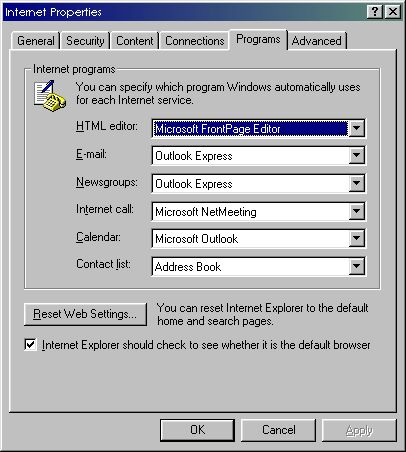
On the screen which opens click the tab at the top called "Programs"
place a check mark in the box that says "Internet Explorer should check to seewhether it is the default browser"
click "apply" then click OK, and close Internet Explorer.
Now reopen Internet Explorer, a box will appear saying "Internet Explorer" is nolonger your default browser, would you like to make it your default? Click Yes. Now closeInternet Explorer.
Next open Netscape. Netscape will show a box saying that it is no longer "associatedwith Internet shortcuts"
Remove the checkmark in the box that says "Netscape should always check tosee....."
Click NO (you don't want it to be your default browser)
and take the checkmark out of the box that says "Netscape should always check to seeif it is your default browser"
and click "never show this again"
and click OK.
Now Internet Explorer is your default browser and will remain so.