

The “Revenge” Trap vs. The Silent Treatment: What’s the Best Way to Handle Cellphone Spam?
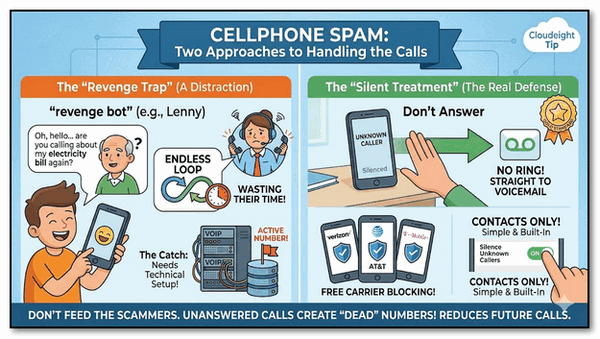
We recently heard from a reader, Kris, who sent us a link to a video making the rounds on social media. (THANKS, KRIS!) The video shows a clever “endless loop” bot designed to trick scammers. It sounds like a dream come true—an automated system that talks to telemarketers for you, wasting their time with a confused, chatty persona.
While these “revenge bots” (like the famous “Lenny” or the Jolly Roger Telephone Co.) are certainly entertaining, they aren’t the “magic wand” they appear to be. In fact, for most of us, they can actually make things worse.
Here is the reason why the best defense against spam isn’t a fancy program—it’s what we call “The Silent Treatment.”
The Problem with “Getting Even”. The goal of these “revenge” videos is to keep the scammer on the line so they can’t call someone else. It sounds great in theory, but here is the catch: Setting up these bots usually requires managing a complex VOIP (Internet phone) server. It is not a simple setting you can “turn on” in your phone.
When you answer a spam call—even if you use a funny bot—you are telling the scammer’s computer that your number belongs to a real, live human and that your number is active and working. This makes your number more valuable to them, and they will almost certainly sell it to other lists, leading to even more spam calls in the future.
The Best Defense
If you want to actually reduce the number of spam calls you get, follow these three simple rules:
1. Don’t Answer!
If you don’t recognize the number, let it go to voicemail. By not answering, your number eventually looks “dead” or inactive to the automated dialing systems. If the call is actually important, a real person will leave a message, and you can call them back at your convenience.
2. Use Your Carrier’s Free Shield
You don’t have to pay extra for protection. Major carriers (Verizon, AT&T, T-Mobile) all offer free apps—like Call Filter or ActiveArmor—that identify “Scam Likely” calls before your phone even rings. Make sure you have yours turned on!
3. The “Contacts Only” Shortcut
This is the single best move for anyone who wants peace and quiet. Both iPhone and Android have a built-in feature called “Silence Unknown Callers” or “Blocked Numbers.” When turned on, any call from a number that isn’t in your contact list goes straight to voicemail without ringing. You’ll still see the notification later, but your dinner (or your nap!) won’t be interrupted. This is something I’ve used for years. You won’t miss any important calls; legitimate callers can still leave a message. So, if you turn this setting on, make sure you check your messages a couple of times every day.
Here’s the real deal
Don’t let the social media “clickbait” fool you. You don’t need a computer degree or a “revenge bot” to stop the spam calls. By practicing the Silent Treatment, you make yourself a boring target for scammers—and eventually, they’ll stop wasting their time on you.
Do you have a favorite way of dealing with pesky callers? Let us know!
On our cell phones, we have used the “Silence Unknown Callers” feature for several years. Caller can always leave a message if they need to. As for our landline (yes, we still have a landline) just not answering works. Call will go to voice mail.
Revenge trap vs the silent treatment.
About 7yrs ago I was caught by answering a number I didn’t recognize. I joked with my Indian molester asking what he wanted to sell me? Big mistake – for the following 5yrs I’d get up to 5 calls a day, yup 7 days in a row. I came to learn 2 things from this ‘waste of space’ 1. Id hang up after viewing my screen or 2. Let it go to Voicemail (which I have turned off). He didn’t care, he just wanted to annoy me. It became quite a joke when I was with people.
Anyway I think it’s the same ‘waste of space’, has Started up again since Christmas.
I’m doing the same. Hanging up or letting it run out. The calls are tapering off.
I don’t think he knows where I live because he never uses my local code. This certainly makes it easier to identify my ‘long lost idiot’.
Feel free to publish this. It’s a true story.
A very boring story but it is still happening.
To the above.
My provider can’t help because these calls are made out of my country, New Zealand.
I have a song for every person in my contacts. Including my bank and doctors. It has always worked for me, but I’m finding that some people who have moved to my state are still using their old number, which my provider blocks for free. I found this out by traveling 52 miles one way to a doctor specialist just to find out my appointment was canceled. People working should not be allowed to use an out-of-state number for business. With all that said, my song contacts does work, because I’ve alerted my doctors to inform any and all referrals of my provider blocking, that they must use a local number. Blessing to all.