

The Microsoft Privacy Dashboard
The Microsoft Privacy Dashboard is one of the most useful—yet frequently overlooked—tools for taking control of your personal digital footprint.
If you use a Windows PC, sign in with a Microsoft Account, use Microsoft Edge, or search with Bing, Microsoft records your online activity. The Privacy Dashboard brings all of that scattered data together into a single, organized web page so you can review and delete it with a click.
What’s inside the Dashboard?
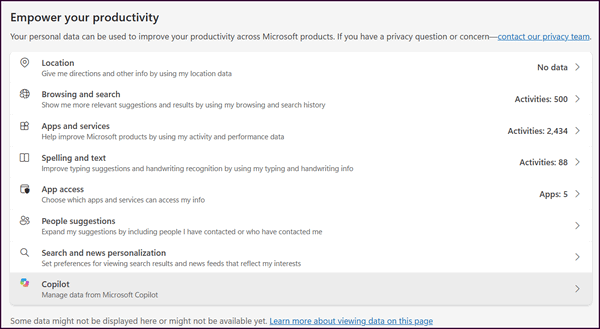
When you log into the dashboard, your data is organized into categories:
Browsing and Search
A complete log of queries entered into Bing. You can clear individual search terms or purge the entire log at once.
Sites visited using Microsoft Edge (when account syncing is turned on).
Location Activity
Saved location data gathered from devices connected to your Microsoft account.
Voice Activity
Saved audio clips and logs from Cortana or other Microsoft speech-recognition features.
Note: If Voice Activity is missing from your Microsoft Privacy Dashboard, it is usually due to one of three main reasons:
No Cloud Voice Data has been collected
or
Device-Only Speech Processing
On Windows 10 and 11, standard voice typing and speech features run locally on your device unless you turn on online speech recognition. Local processing never reaches Microsoft servers, so nothing appears on the dashboard.
App & Service Activity
Usage logs showing when and how often you launch Microsoft applications and services.
Ad Settings
Options to turn off targeted, personalized ads based on your interest profile across Microsoft services.
How to Access and Clean Up Your Data
-
Sign in using your main Microsoft Account credentials.
-
Expand any section—such as Search history or Browsing history.
-
Click Clear all activity for a fresh start, or delete specific items line by line.