

AbleWord: A Free, All-In-One Word Processor & PDF Editor
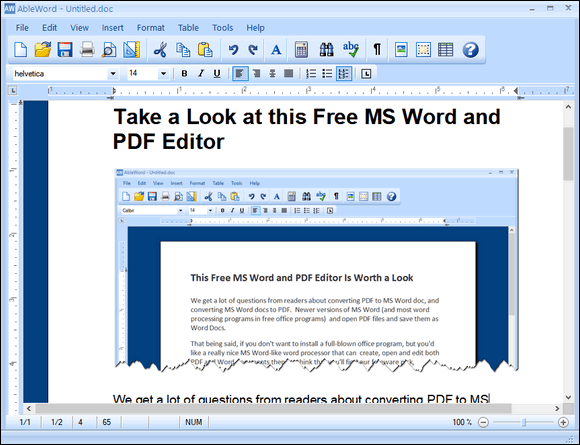
While many modern word processors have become cluttered with complex ribbons and expensive subscription models, AbleWord stays true to what most of us actually need: a fast, clean, and completely free way to write and edit.
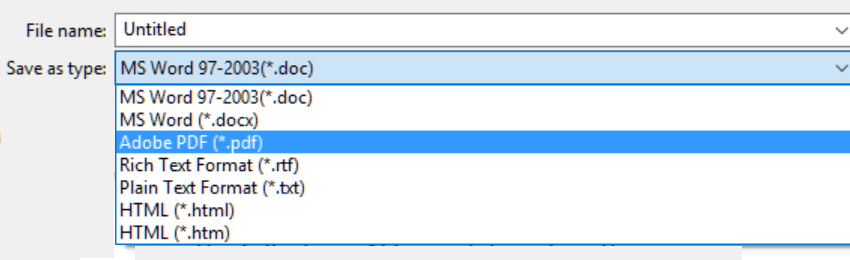
Also, many readers have asked about converting PDF to MS Word docs and converting MS Word docs to PDF. Newer versions of MS Word (and most word processing programs in free office programs) can open PDF files and save them as Word Docs. But very few can open Word Docx files and convert them to PFF files. AbleWord can.
So, if you don’t want to install a modern, fancy, full-blown office program full of AI tools and integrated cloud connections, and you’d prefer an old-fashioned, really nice, light-weight, MS Word-like word processor that can create, open, and edit both PDF and Word documents, you’ll find AbleWord worth a look.
The folks at AbleWord describe it this way:
AbleWord is a very capable word processing application that can read and write most popular document formats including PDF’s. It is fully featured, supporting image formatting, tables, headers & footers and includes spell checking and print preview functions. Best of all it is totally free even for commercial use.
And in our tests, it worked extremely well despite being a free program that hasn’t been updated since 2015. But don’t let that worry you. It works on Windows 10 and all versions of Windows 11, even though the website only includes Windows versions up to Windows 10. Don’t you worry! We tested it on Windows 11, and it works well.
You can create, open, and edit the following formats with AbleWord:
- Word.doc
- Word.docx
- RTF (Rich Text Files)
- TXT (Plain Text Files)
- HTM (Web page)
- HTML (We page)
More information from the AbleWord Web site:
…AbleWord.highly compatible with popular document formats including .DOC & .DOCX but AbleWord can also open and save as a PDF which makes it a very useful tool to have.
AbleWord (is) very simple to install and use, it is commonly used as a PDF Editor and also for converting PDF to Word® but of course it is also a splendid Word processor and supports most of Microsoft Word® features.
We found AbleWord very easy to use. The PDF editing function works well on most common PDF files, but is so-so on more complex ones. So, we’re not saying that it’s as good as an expensive, professional PDF editor like Adobe Acrobat Pro. But AbleWord doesn’t cost hundreds of dollars either. It’s 100% free. Yay!
While it hasn’t been updated in eleven years, AbleWord still looks great. It has a nice, simple, almost quaint but functional, easy-to-use interface.
Here are some screenshots:

If you have MS Office or MS365 installed, listen up! AbleWord will try to associate itself with MS Word DOC and DOCX, which is great if you don’t have MS Office installed or some other Office program that handles DOC and DOCX formats installed. BUT If you have MS Office or another office program installed, you might want to uncheck this during installation.
If you’re looking for a free, functional, easy-to-use Word processor that can edit both Word documents and PDF files, then AbleWord might be just what you’re looking for.
Read more about, and/or download it from the AbleWord Website.
If you’re concerned about downloading AbleWord from a non-HTTPS (not secure) website, you can download it from SnapFiles.