

Is Your Hard Drive Full? Meet WizTree!
Despite today’s large hard drives, it seems that lately we’ve had quite a few folks write us and tell us their hard drive is full. Windows pops up with that dreaded red bar: “Disk Space Low.” Usually, this means a “digital cleaning” is in order, but finding where the clutter is hiding is like looking for a needle in a haystack. Without an app to help you, it can be a real chore to find out what’s using up all your hard drive space.
Today, we have a great “freeware” program for you called WizTree. WizTree is a disk space analyzer. It’s a tool that takes an “X-ray” of your hard drive and shows you exactly which files are hogging all the space and where they’re hiding.
In the past, we’ve recommended other programs that do this, like our old favorite WinDirStat, but they can be slow. When you click the “Scan” button, you can go make a pot of coffee and have a cup before the results are in. But WizTree is different. It is lightning fast. Because of the unique way it reads your computer’s “internal index” (the MFT), it can scan a massive hard drive in less than 15 seconds.
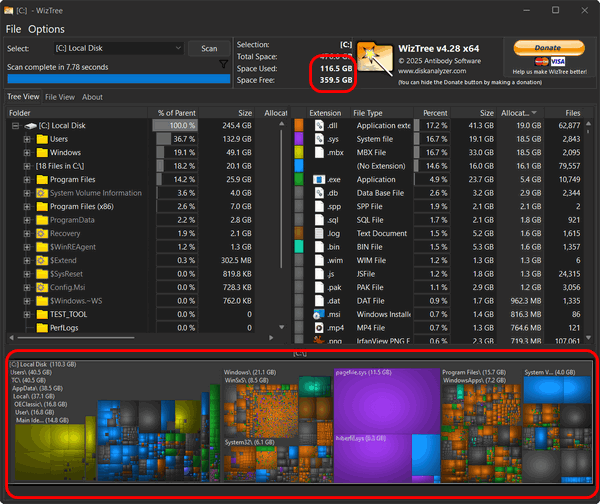
You don’t need to be a geek to use it. When it finishes scanning your drive, it shows you a colorful map of blocks. The bigger the block, the bigger the file. If you see a giant purple square taking up half the screen, you can be pretty sure that’s the culprit that’s using up a lot of your hard drive space. You can click on that square, and WizTree will tell you exactly what it consists of, and if it’s junk or something you don’t need, you can delete it.
WizTree is safe. It’s free for personal use (they do have a “Donate” button if you want to show your appreciation). WizTree doesn’t install any “junkware” or “toolbars” or any of the kind of stuff we always warn you about.
So, if you’re getting low disk space errors or you just want to declutter your hard drive to make sure you’re making the best use of the available space, WizTree is what you need to do the job quickly and safely.
BUT…
Just remember, you’ll need to “THINK” before you delete a giant file and make sure it isn’t something Windows needs! If it’s in a folder called “Windows” or “System,” it’s best to leave it alone. But if it’s 100GB of temp files ora 10 GB movie from 2015, you can delete it and free up a lot of space.
You can read more about and/or download WizTree here. It’s available as a portable app, or you can download the installer. Either way, WizTree is a great freeware program if you’re looking to find out what’s using your disk space.