

Use Windows Update to Reinstall Windows 11 Without Losing Anything
Did you know you can use Windows Update to reinstall Windows 11 to fix PC problems without losing anything? It’s true. Using Windows Update to reinstall Windows 11 allows you to keep everything — all of your apps, programs, files, and settings will be preserved.
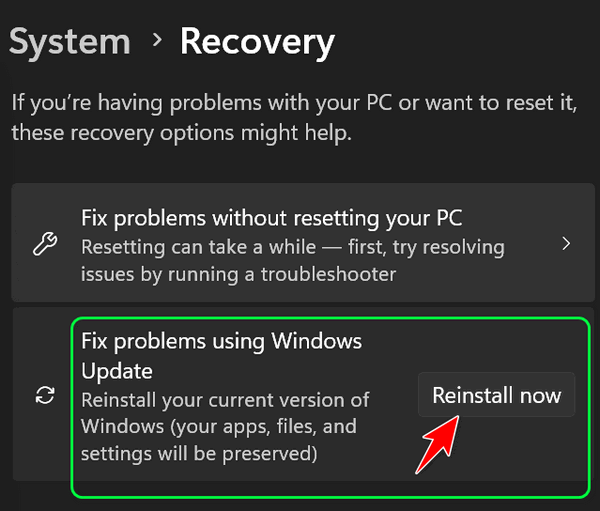
Windows Update can help fix problems with your PC. Fixing problems using Windows Update is a recovery tool that can help fix computer problems and resolve update-related issues. Using this tool will reinstall the current version of Windows on your device. This tool preserves all your apps, programs, files, documents, and settings. Make sure to keep your PC connected to a power source and the internet during reinstallation.
Here’s how to use Windows Update to Repair Windows
1> Open Settings (Windows key + i )
2> Click on System
3> Click on Recovery
4> Next to “Fix problems using Windows Update,” click “Reinstall now.”
After you click “Reinstall now”, you’ll see the following prompt. Make sure you stay connected to the internet and a power source during the Windows 11 reinstallation process.
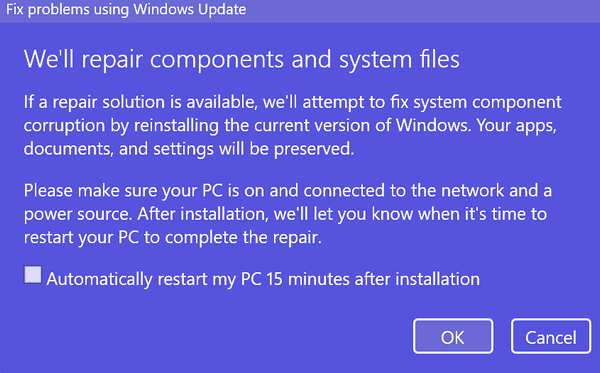
After you’ve read the information in the dialog, click “OK” to start the Windows reinstallation process.
I tried this and couldn’t find a fix for problems with Windows updates.
Did you reset your computer?
Is this post legit? I don’t think so.