

What’s Your Computer’s Reliability Score? Let’s Find Out!
The Windows Reliability Monitor is one of the most useful “hidden” tools in Windows. Instead of a vague star rating, it gives you a Stability Index from 1 to 10 based on how your specific PC has performed over the last few weeks.
Here is how to find your rating and what those numbers actually mean for Windows 10 and 11.
How to find your Reliability Rating
Both Windows 10 and 11 hide this app deep in the Control Panel, but you can find it in seconds:
Press the Windows Key.
Type “Reliability” into the search bar.
Select “View reliability history.”
All About the “Stability Index” (1–10)
The graph shows a blue line that fluctuates daily. The blue line tells your computer’s reliability score for each day.
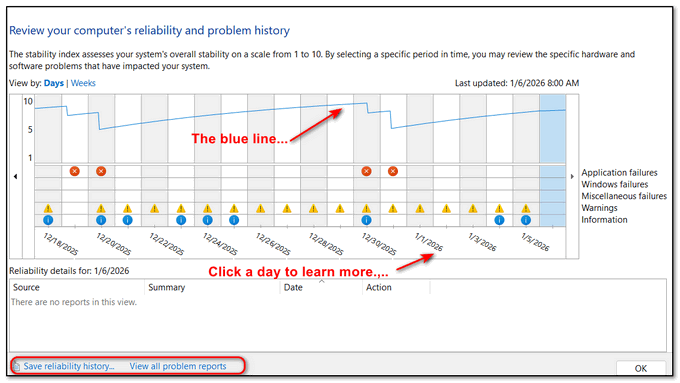
As you can see in the screenshot above, my laptop score averages around 7 – so I’m in good shape – or at least my laptop is!
What’s your computer’s reliability score?
10 (Perfect): Your system has had zero “critical” events (crashes, forced restarts, or hardware failures) for several days.
5–9 (Normal): You’ve had a few “Application Failures” (like a web browser closing unexpectedly), but the Windows “Kernel” (the brain of the OS) is stable.
1–4 (Critical): Your system is likely experiencing “Blue Screens of Death” (BSODs), driver failures, or unresponsiveness.
Understanding the “Critical Events” Follow the little blue line!
Below the graph, you will see icons for each day. Clicking on a day reveals the culprit:
Red X (Critical Event): A program or Windows itself crashed.
Blue “i” (Information): A successful update or installation.
Yellow Warning: A non-fatal error (like a driver that failed to load but didn’t crash the PC).
Also, be sure to look for any items in the list that say “Check for a solution” in the status column. If you seen one, click that link, and Windows will “phone home” to Microsoft’s servers to find a solution for that particular issue. If it finds one, follow the prompts to install it. This is often the fastest way to fix a Windows stability issue.
Hi, Dynamic Duo!
This item could be very revealing in more ways than one. I can’t wait to run my system through it.
Another example of the revealing things you both send our way week after week.
I hope you’re weathering the storm (weather) there. I hear it’s been atrocious lately. Sympathy.