

Google Chrome’s New Reading Mode: A Blessing for Tired Eyes!
With version 146, Google quietly released a new reading mode. After trying it out for a couple of days, I rather like it. It’s different.
If you’re tired of trying to read articles on the web that are cluttered with ads, useless videos, and useless content — and you use Google Chrome — I think you’ll like the new Reading Mode.
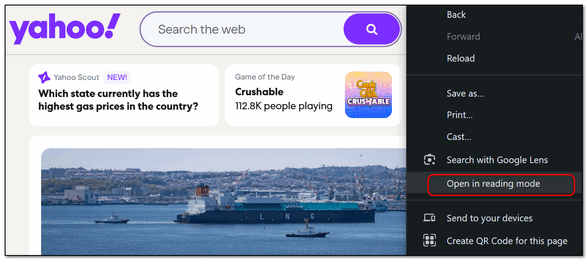
To access it, to any page that contains content you want to read and right-click on the page. Then choose “Open in reading mode” from the drop-down menu that appears.
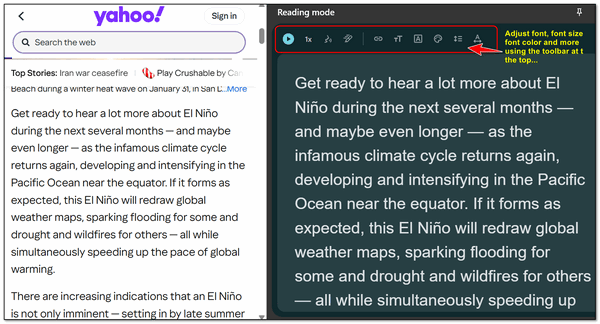
You can select any article on the page and open it in the new Reading Mode. You can also adjust the font, font-size, font-color, and more by using the toolbar at the top. You can also have the page read to you.
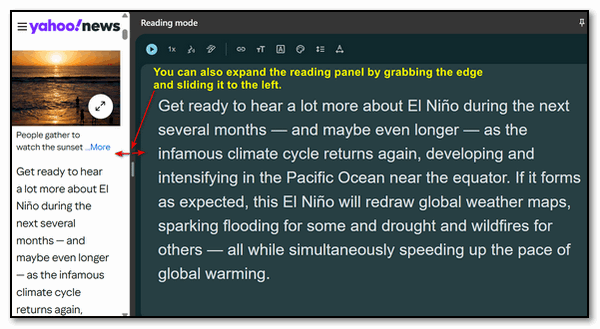
You can also adjust the size of the reading page on the right by grabbing the left edge and sliding it right or left to increase or decrease the size of the reading pane.
So, the next time you find yourself on a page and you’re having trouble reading it, try Chrome’s new Reading Mode.
I like it a lot Thanks