

What Kind of Hard Drive Do You Have?
Whether you’re using Windows 10 or Windows 11, here is an easy way to find out if you have a standard hard drive (HDD), a solid-state hard drive (SSD), or maybe both.
Do you have an HDD (Standard Hard Drive) or an SSD (Solid State Hard Drive)?
Right-click on the Windows Start button. Click “Run” (or press Windows key + R). In the Run box, type dfrgui and press Enter.
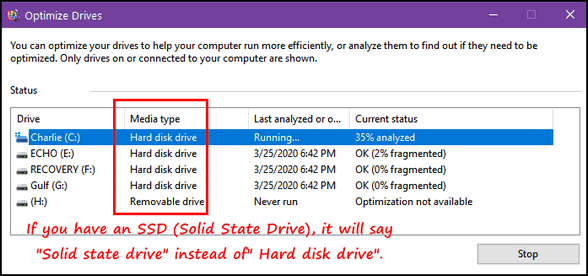
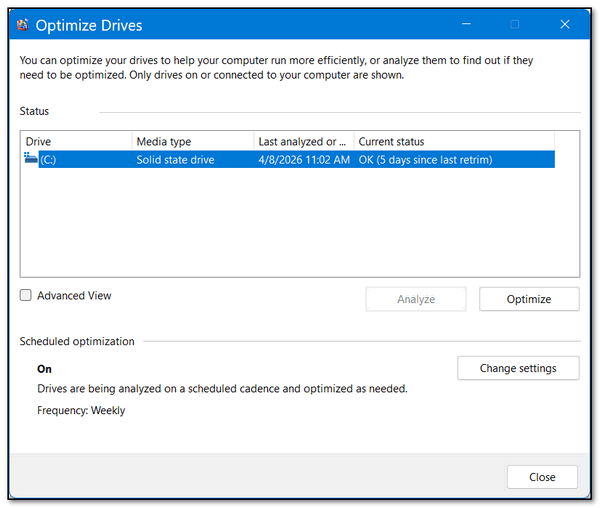
Look under “Media type”. Standard hard drives (HDDs) show up as “Hard disk” drives, and Solid State Drives (SSDs) show up as “Solid state” drives.
And what the heck does Retrim mean?
If you have a sharp eye, you saw in the last screenshot “5 days since last retrim.” In case you’re wondering what that means…
Retrim is often used interchangeably with TRIM when referring to solid-state drives (SSDs).
TRIM is a command that informs the SSD which data blocks are no longer in use.
This allows the SSD to efficiently manage its internal storage by marking these blocks as available for reuse. This process helps maintain the SSD’s optimal performance and longevity.