

The Ultimate Music Manager: MusicBee
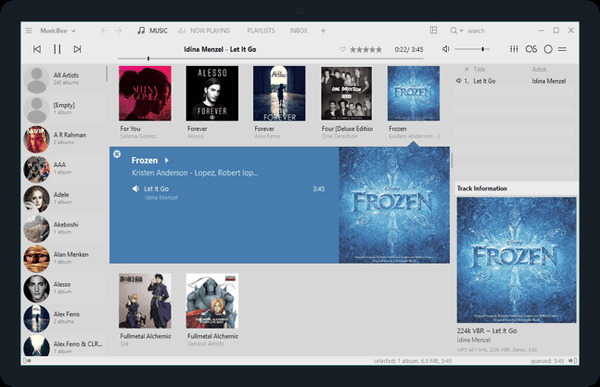
The other day we had a request from one of our subscribers asking about music players, organizers, and CD rippers. I had to be honest – we’re not the biggest audiophiles in the world. So we did a little checking and digging and found MusicBee – the ultimate music manager. We recommended it over 10 years ago when it was brand new. It was good then: it is great now!
So, if you have tons of MP3s, CDs you’ve ripped over the years, or high-quality audio files, you already know the struggle. Big streaming apps don’t handle local files well, and basic media players feel a bit too bare-bones when you’re trying to find that one specific track.
That’s why we highly recommend MusicBee. MusicBee is considered the best choice for anyone who still loves owning their own music library. It’s packed with incredible features, but it won’t bog down your computer or hog your PC’s memory. And it’s 100% free. It’s not trialware, it’s not shareware, it’s freeware.
All About MusicBee
-
It Organizes Enormous Collections Instantly: Whether you have 500 songs or 50,000, MusicBee catalogs them effortlessly without lagging, freezing, or crashing.
-
Fixes Messy Song Titles Automatically: If your music folders are a mess of “Track 01” and missing album covers, MusicBee has built-in smart tools to look up missing info, grab the right album art, and even pull up the song lyrics automatically.
-
Sounds Incredible: For audiophiles, it supports high-end audio formats and features native WASAPI and ASIO support, bypassing the standard Windows sound mixer for the cleanest, crispest sound possible.
-
Make it Look However You Want: Don’t like the layout? Change it! You can skin MusicBee to look like a sleek modern app, a classic music player, or a colorful jukebox.
-
Easy Syncing: It makes it a breeze to move your favorite playlists and albums over to your Android phone, tablet, or a portable USB drive.
Yes, and It’s Really FREE!
There are no ads, no annoying premium pop-ups trying to get your credit card, and no hidden junkware. It’s just clean, brilliant software that does exactly what it promises. It works on Windows 10 and Windows 11. You can download it directly from the official Microsoft Store or the MusicBee website—or get a “portable” version from the MusicBee website that doesn’t even require a formal installation.
Here’s what MusicBee’s developer has to say:
The Ultimate Music Manager and Player
MusicBee makes it easy to manage, find, and play music files on your computer. MusicBee also supports podcasts, web radio stations and SoundCloud integration.
Simple, Powerful, and Fast
Play your music the way you want. Turn your computer into a music jukebox. Use auto-tagging to clean up your messy music library. Enjoy a great music experience with MusicBee.
Beautiful Skins
Change the appearance of MusicBee by choosing from the included skins or download more from our Add-on section.
Skins are a great way to personalize MusicBee to your liking.You can also make your own skin and share it with others.
Sync with Devices
Sync your music collection with devices you use. MusicBee supports playlist and podcast syncing, even supports audio books with 2 way syncing.
Convert formats on the fly if your device does not support certain formats.
You can also sync your Android and Windows Phone (8.1+) devices.
last.fm, CD Ripping, Tagging tools…. plus more!
MusicBee packs a comprehensive set of features to make your music experience better.
Yet it is one of the most lightweight player using about 25-70 MB ram* with skins and add-ons, and packs all of these under 10 MB!
If you’ve been looking for a highly customizable media player and manager for Windows designed to organize, find, and play large digital music collections. And a media player that serves as an advanced alternative to software like iTunes or Windows Media Player, offering robust tagging, gapless playback, and audiophile-grade sound card support, MusicBee is what you’ve been looking for.
It’s a Cloudeight Freeware Pick! You can read more about MusicBee and/or download it here.