

GlassWire: A Window to Your Wireless Network
Have you ever felt like your computer was keeping secrets from you? We’ve all been there—wondering why the internet is suddenly sluggish or why that little light on your modem is blinking like crazy when you aren’t even browsing the web. In the digital age, what you don’t see can sometimes be just as important as what you do.
That is why we are so fond of GlassWire. Think of it as a set of high-tech “X-ray specs” for your computer’s internet connection. It turns all that invisible “computer-talk” into an easy-to-understand picture so you can see exactly who is visiting your PC and where your data is going.
Traffic Monitor
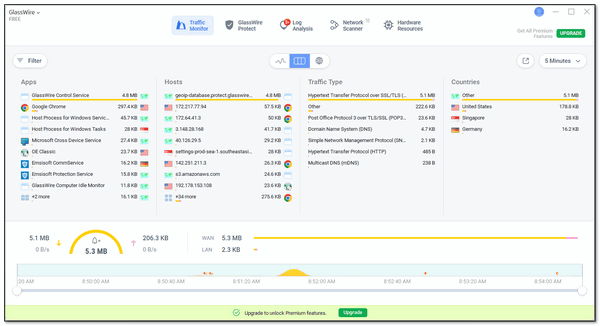
The heart of GlassWire is the Traffic Monitor. Instead of long lists of numbers, it shows you a simple graph of your internet activity. If you’re watching a video, you’ll see a tall mountain of data; if you’re just typing an email, it’s a very small hill. It even shows you the different countries your apps are “talking” to. It’s a great way to spot if a program is sending your information somewhere it shouldn’t be!
GlassWire Protect
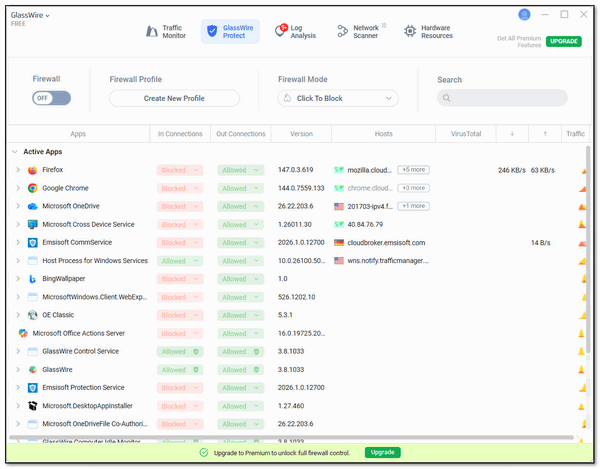
Every home needs a good lock on the door, and that’s what GlassWire Protect (the firewall) does for your PC. It’s much simpler than the standard Windows tools. If you see an app you don’t recognize trying to use your internet, you can block it with one click. We especially like the “Ask to Connect” feature—GlassWire will pop up a friendly note asking your permission before letting any new program go online.
Log Analysis: What was going on while you were away?
Ever wonder what your computer does while you’re not looking? The Log Analysis section (formerly called Alerts) keeps a history for you. It records the first time any app connects to the web and warns you if a program’s “ID” has changed, which is often the first sign of a virus or malware trying to hide. It’s like having a security guard who’s always on duty.
Network Scanner: Who’s on Your Wi-Fi?
Is your neighbor “borrowing” your wireless signal? The Network Scanner is the easiest way to find out. It gives you a simple list of every phone, tablet, and smart gadget currently using your Wi-Fi. It will even send you a quick “heads up” notification the moment a new device joins your network, so you can make sure your connection stays private and fast.
GlassWire is easy on your computer’s resources. It’s designed to use very little of your computer’s “brainpower” (CPU and RAM). While it’s busy working, it stays in the background; it never slows down your computer.
If you want a clearer, safer view of your wireless internet connection, GlassWire is a great addition to your toolkit. It’s friendly, it’s free for basic use, and it puts you back in charge of your wireless network.
Glasswire works on Windows 10 and Windows 11.
Read more about GlassWire and/or download it here.
Does It matter that you have a firewall installed and on?
It makes no difference if you use a Firewall. In fact, most everyone using Windows 10 or Window 11 is using a firewall though they may not realize it
I installed this app and several hours later, uninstalled it. My machine had fits and starts, pauses that were abnormally lengthy, making typing very tedious, and on two occasions, the laptop froze and required a restart. After uninstalling later that day, I had my old, familiar machine back, so there were no hiccups while typing this.
FYI: Device name TERRYLAPTOP
Processor Intel(R) Core(TM) i5-1035G1 CPU @ 1.00GHz (1.19 GHz)
Installed RAM 12.0 GB (11.8 GB usable)
Device ID C1DEFFE0-2AE0-4117-AC7A-57C1682FB09E
Product ID 00325-97248-03261-AAOEM
System type 64-bit operating system, x64-based processor
Pen and touch No pen or touch input is available for this display
Not blaming anyone or thing, just thought you should know.
Thats very odd because one of the features of Glasswire is how very little in the way of system resourcs it uses. I used it for a week before we featured it and I, honestly forgot it was running. So I don’t know what you have going on there but it would be strange for a program that is notorius for using a small amount of resources to cause the problems you’re having. I can’t explain it. We test everything we recommend on at least 2 computers.
Here’s screenshot of File Explorer with GlassWire running. As you can see it’s very light on resources.
Also based on discussions on Reddit (r/HomeNetworking, r/Windows, r/cybersecurity), GlassWire is generally considered light on system resources for most users. It is often described as a user-friendly interface that sits on top of the native Windows Firewall, rather than replacing it, which helps minimize performance impact.
Again, every computer is different and we can’t test a program on every computer. We test them on at least 2 Windows PCs, check with VirusTotal and do a general reputation check before we post a recomendation.
I cannot tell you why it cause problems on your computer.Sorry.