

Our Annual Christmas Gift to You… Merry Christmas 🎁

It’s Christmastime, and it’s time for reflection and for remembering all the blessings for which were are so thankful.
Many years ago, we started Cloudeight Stationery. At one time, we were among the top 500 websites, and we had over 200,000 subscribers to our Cloudeight Stationery Newsletter. After Windows 7 was released, Outlook Express/ Windows Mail faded away, and gradually, so did our stationery, and we almost went with it.
Here we are 18 years after the release of Windows 7 and the demise of Outlook Express/Windows Mail. We only have one-tenth of the newsletter subscribers we had then. We lost thousands of subscribers since the decline of the stationery days. But here’s how we look at it – we may have lost thousands of “subscribers,” but we have made thousands of friends.
If you subscribe to one or both of our newsletters, you’re not a subscriber; you’re a friend. We are thankful for all of our friends. We a grateful for your friendship, generosity, and support. If it were not for your friendship, generosity, and support, we would have joined the tens of thousands of websites that disappeared from the web over the past twenty-seven years.
We try to give back as much as we can. We try hard to promptly answer your computer questions and help as many of you as we can via email at no charge. We’ve kept the prices for our Cloudeight Direct Computer Care services low – and we’ve not raised them in over a decade. We do all we can to help all our friends. We try hard to earn and keep your trust.
We always remember that without you, our small business would have perished long ago.
At this special time of year, we’d like to give all of you a little gift, something we hope will brighten your holidays a little more. It works on all versions of Windows, including Windows 10 and Windows 11. It’s a tradition now, and we call it the Cloudeight WinterHouse Screen Saver.
The Cloudeight WinterHouse animated screen saver features falling snow and many more user-customizable features…
- User-configurable Scene and Music Controls.
- Choose falling snow or a clear winter night complete with shooting stars.
- Turn door or cabin lights on and watch them gently flicker or turn them off!
- Smoke swirls from the chimney if you choose.
- Configure star patterns randomly or based on the time of year.
- Use in silent mode or choose from three beautiful Christmas songs.
- Display Time or Date/Time on the active screensaver.
We hope you enjoy our WinterHouse Screen Saver not only during the Christmas season but all winter long.
It works on all versions of Windows, including Windows 10 and 11.
If you’re using Windows 10 or Windows 11, it’s important that you right-click on the WinterHouse Screen Saver installer and choose “Run as administrator” to install it.
We’ve combined our WinterHouse Screen Saver Download and Help pages into one for your convenience.
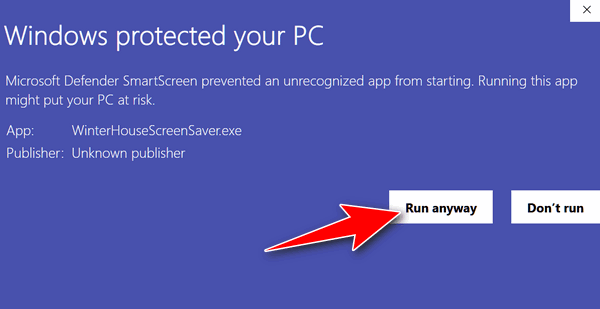
IMPORTANT NOTE PLEASE READ: Windows SmartScreen, which is not so smart, may try to stop you from installing our screensaver. Our screensaver has been safely installed on Windows computers for over two decades. If you get a warning from Windows SmartScreen, click “More info” then click the “Run anyway” button. See the bottom of this post for complete instructions.
If Winterhouse is blocked by Windows SmartScreen
How to install Winterhouse Screensaver if you get a SmartScreen warning:
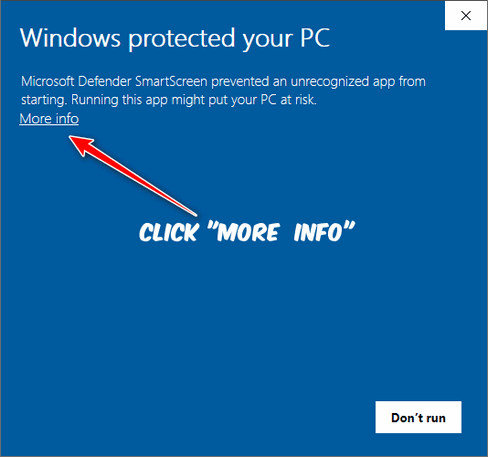
Click on “More info” as shown above…
Click the “Run anyway” button on the next screen.
Note: You may have to drag the right edge to see the Run Anyway button.
Thank you all so very much for your friendship and support. We both wish you a very Merry Christmas, a happy holiday season – and all the best in the New Year!

Ho ho, you two!
I’ve always enjoyed your ‘Christmas House’ screensaver and, right on time, here it is again! Thank you very much.
I’ve already sent you Christmas greetings, so this time, here’s looking forward to a very happy and successful 2026! All the best.
thank you for the screen saver., I can’t run it. No matter what I do, there is no Run As Administrator for me to click on. it brought up the page to install it and I do that and then I get a little screen with a bunch of things and I try to go to exit and I cannot check on any of the little boxes that are on the page. I thank you for sending it to me.
There is “Run as administrator” on every Windows 10 and 11 computer. You have to right-click the installer you downloaded from us and choose “Run as administrator” to install the screensaver. If you don’t, it won’t run.