

POP3 vs. IMAP – All About Your Email Setup
Over the years, we’ve helped many people set up their email in programs like Thunderbird and OE Classic. And one thing that keeps coming up — over and over again — is that most people have no idea there’s a difference between POP3 and IMAP. Honestly, why would they? It’s not exactly dinner table conversation. Some of you may not have even heard those terms before.
But here’s the thing — it matters. A lot.
So whether you’re setting up email on a laptop, desktop, iPhone, iPad, Android phone, or tablet, do yourself a favor: always choose IMAP over POP3. And if your internet provider doesn’t offer IMAP, just grab a free Gmail or Outlook account and use that instead. You’ll thank yourself later.
Let’s break it down simply.
POP3 — The Old Way
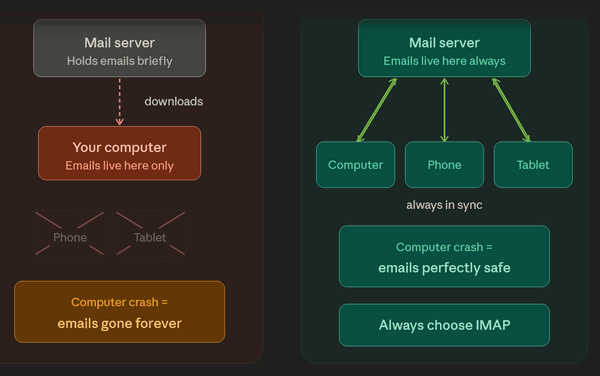
POP3 downloads your emails from the mail server and parks them permanently on your computer. That’s it. They live on your machine and nowhere else. So if your computer crashes, or gets lost, you accidentally delete a folder in your email program, your emails are gone. Unless you’ve backed them up, which, you can bet, most people haven’t. Think “POP goes the weasel.”
IMAP — The Smart Way
IMAP keeps all your emails on the server, not just on one device. That means you can check the same inbox from your PC, your phone, your tablet — wherever you are. Everything stays in sync automatically. Read something on your phone? It shows as read on your computer too. And if your computer dies tomorrow, your email is completely safe. It’s just sitting there on the server waiting for you… accessible to any device with a mail client set up to check your email.
So, Which Should You Use?
IMAP. Always IMAP. We can’t say it enough.
Wait — There’s a 2026 Update You Need to Know About
Both Google and Microsoft have been making big changes to how email apps log into their servers. The old method — basically just typing in your username and password — has been phased out in favor of a more secure system. Google pulled the plug on the old method in March 2025, and Microsoft is finishing the same transition right now in 2026.
What this means in plain English: if you’re using an older email program that hasn’t been updated in a while, it may have already stopped working with Gmail or Outlook — or it’s about to.
The good news? The fix is easy. Just make sure your email app is up to date. Current versions of Thunderbird, Apple Mail, and most smartphone mail apps already handle all of this behind the scenes without you having to do a thing.
IMAP isn’t going anywhere. It’s still the right choice. Your email software just needs to be reasonably current to keep things running smoothly.
The bottom line hasn’t changed one bit — whenever you set up email on any device, always choose IMAP. Just make sure the app you’re using isn’t a dinosaur, and you’ll be absolutely fine.
Excellent tip! You explained a lot!