

Quick Machine Recovery: What It Is & How to Turn It On
Think of Quick Machine Recovery as a built-in “Self-Repair” system for Windows 11. It is designed for those times when your computer won’t start up at all—usually due to a bad software update or a corrupted system file.
Instead of needing technical help or a specialized recovery USB drive, the computer attempts to fix itself using the internet.
How QMR (Quick Machine Recovery) works
When Windows fails to start several times in a row, it automatically enters a “Recovery Mode.” If this feature is active, the following happens:
1. The computer connects to the internet before Windows even loads.
2. It “phones home” to Microsoft’s servers to see if there is a fix for why it is crashing.
3. If a solution is found (like a replacement for a corrupted Windows system file), it downloads and replaces that specific file and installs it.
4. The computer restarts and attempts to load Windows normally again.
Quick Machine Recovery preserves your data.
Unlike a “Factory Reset,” or a full “Windows Reset,” which can wipe your apps and files, this feature only looks for the specific “broken” parts of the operating system and tries to fix them.
It is intended to run automatically in the background, meaning you don’t have to navigate complicated menus or search for solutions on the internet to get the computer running again.
Because it retrieves the latest fixes from Microsoft servers on the internet, it can fix brand-new problems that weren’t known when the computer was first built.
For Quick Machine Recovery to work, the computer must be plugged into a power source and have internet access (either via a network cable or Wi-Fi). And, Quick Machine Recovery must be turned on.
Here’s how to turn on Quick Machine Recovery on your Windows 11 PC
First, let’s check whether Quick Machine Recovery is enabled.
Click the Start button and select the Settings gear icon (or press Windows Key + I).
On the left side, make sure “System” is selected.
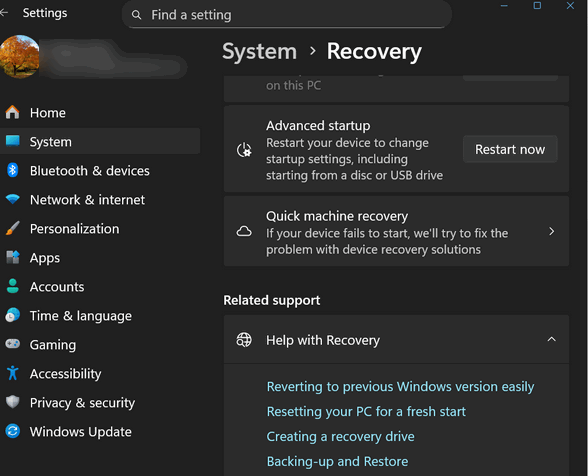
Scroll down on the right side and click on Recovery.
Under the recovery options, you should see a section titled Quick machine recovery.
If the switches are on, the feature is active. If they are off, you can turn on Quick Machine Recovery by turning the switches on:
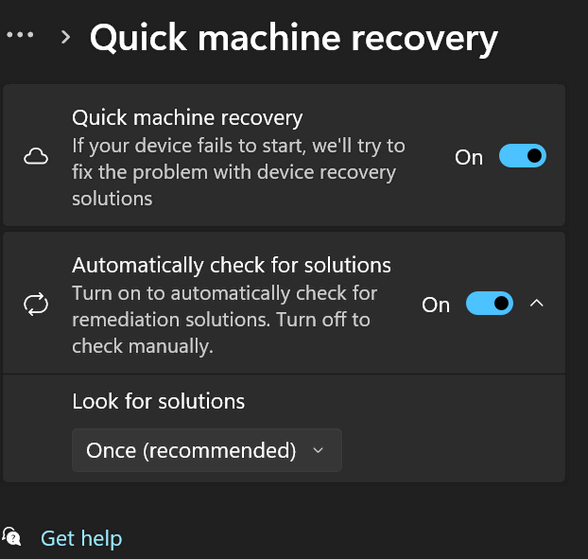
Note: QMR (Quick Machine Recovery) is available in the latest versions of Windows 11 (specifically version 24H2 and later). If you don’t see this option, your version of Windows might not support it yet.
IYKYK 😊
Article stated PC must be “[lugged in ..”.
A__Is this absolutely necessary, even for a Laptop PC?
B__Has anyone checked out this fact thoroughly yet?
C__Any one know why AC Power would be required for this recovery process, if indeed needed?
Especially for a laptop. The testing period for Quick Machine Recovery (QMR) lasted approximately four months in the public eye before it reached “General Availability.” While the public “Insider” testing took about four months, Microsoft likely spent the eight months between the July 2024 outage and the March 2025 preview building the infrastructure to ensure the “Cloud Mechanic” could reliably talk to broken computers.
Obviously during the process if the computer (laptop) ran out of power (no battery/no AC) the computer would not be able to reboot nor would any fixes be able to be downloaded or install. You couldn’t manually install anything if a laptop was not plugged in and the battery was low or discharged…right?