

Quickly Jump From the Newest to the Oldest Mail in a Gmail Folder
Did you know that you can jump to the oldest emails in your list of emails in any Gmail folder with just one click?
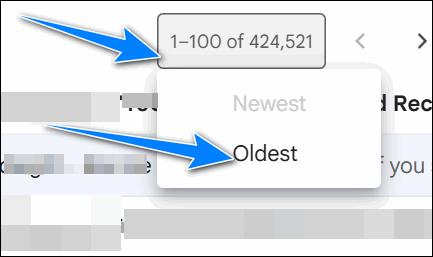
In your Gmail account. Look for “1-100” right above the email list and hover over it until you see a dropdown menu. If you’re viewing your newest, you’ll see “Oldest” in the menu. Click “Oldest” to go to the “bottom” (oldest) of your list of emails. It doesn’t matter if you have a few hundred or if you have tens of thousands of emails; once you click “Oldest,” you’ll go to the very bottom of the list of ( your oldest) emails.
When you’re viewing your oldest emails and want to jump back to the top ( newest emails), hover over the email count and click “Newest”.
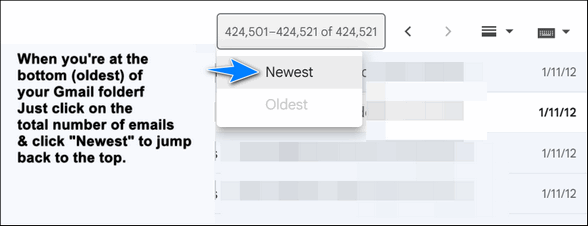
This method works in any folder (Inbox, Sent, All Mail, etc.) And it works regardless of the number of emails in a folder.
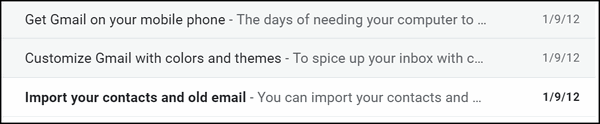
We started one of our Cloudeight Gmail addresses over ten years ago, and so far, we have saved over 400,000 emails in the Gmail “All mail” folder. And using this tip, we can jump back more than thirteen years in less than two seconds, see? These are the first emails we received after we set up our Gmail account.
Very sadly I am currently getting of an age whereby I don’t understand the new systems! Can you honestly tell me if I quite likely could get into trouble?
My goal here is to simply make a MAJOR CLEAN-UP as I DO NOT WANT TO BUY ANY MORE SPACE. In fact, I intend on cancelling my current CLOUD file!!!
I cannot tell you what to delete. You have to decide that to keep. Your ALL MAIL folder has copies of all your email so you could start by deleting all the old emails your inbox. But still I don’t know which emails you want to keep. Only you can decide that.