

This Simple Tip Could Speed Up Your Windows Computer
Turning off SysMain might speed up your Windows 10 / Windows 11 PC
SysMain was called “SuperFetch” back in 2018. Microsoft has since changed its name but not its function.
SysMain is supposed to be a system optimization feature to help speed up your PC’s performance. However, SysMain can often cause high disk, CPU, or Memory (RAM) usage that can make your PC run slower. Luckily, you can easily turn off SysMain without harming your computer or Windows installation.
Here’s how to disable SysMain on your Windows 10 or Windows 11.
1. Type SERVICES.MSC in the taskbar search and press Enter.
2. Locate SysMain and double-click it.
3. Next to “Startup type,” click on the down arrow to expand the list and choose “Disabled.”
4. Click the “Stop Button.”
5. Click Apply/OK
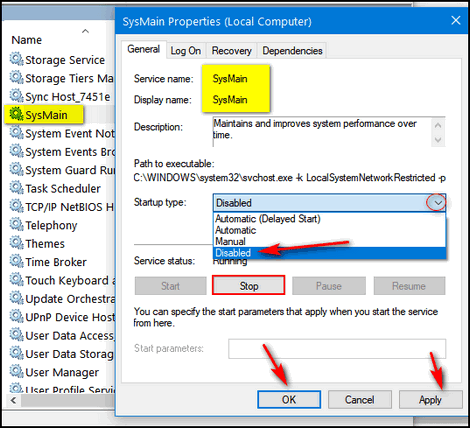
6. Restart your computer.
If your computer is running slowly, turning off SysMain is one of the things that might help speed it up without causing any problems.
Like our tips & tricks? Please help us continue to help you!

I found mine to be already disabled, and the ‘Stop’ button was greyed out.
I guess I’m in good shape?