

Saturday Bonus Questions and Answers – 102426
Next weekend brings with it Halloween and a trick or treat, depending on how you look at it. We turn the clocks back an hour – you know – “fall back”. But today is just a normal autumn Saturday, and time for another Saturday Bonus Questions & Answers edition.

Sometimes, the best tips and tricks are hidden in the published questions and answers. And rarely do we post questions and answers on this website. Today, we’re featuring some of the questions and answers from past issues of our InfoAve Weekly newsletters.
These questions & answers were selected at random from past InfoAve Weekly newsletters.

Donate today and help us keep on helping you!
Saturday Bonus Questions and Answers – 102426
Bonnie wants a free alternative to Microsoft Money
I know you have posted things in your daily and weekly newsletters concerning a replacement for Microsoft Money. But as I was searching your website, etc., I couldn’t find anything concerning it. My Microsoft Money is going down the drain, boohoo. I loved it, but I really need to get something new to replace it. I don’t know if I could live without some type of money software. Would you give me some ideas on what I can use to make it easy for this old lady? Thanks, and may God bless you both, Bonnie.
Our answer
Hi Bonnie. We’re Sorry to say neither of us has ever used Microsoft Money, nor do we use any kind of financial software. Since we don’t like to recommend something without trying it first, and since financial software is not something we could quickly and easily test, I’m going to defer to one of our previous Cloudeight site picks, “AlternativeTo”.
See this page at AlternativeTo for several good free replacements for Microsoft Money.
We hope this helps you, Bonnie.
Jim wants to know if this deal on MS Office is legitimate
I’m curious about the advertisement for Microsoft Office Professional Plus 2019. It seems like an offer too good to be true. Is it? You guys have been an important part of my 20 years of computer experience, and I trust your judgment. Keep it up, PLEASE! Jim
Our answer
Hi Jim. Thanks so much for your long-time support and your kind words.
If it seems something is “too good to be true,” it almost always is. Many companies outside of the USA don’t prosecute software and intellectual property violations as we do in the USA. So often, you’ll see pirated copies of Office being sold for unbelievably low prices.
And then there’s the gray area of OEM software. This is when a company, such as a computer manufacturer, purchases a bulk license from Microsoft that allows them to include MS Office on the computers they sell. Sometimes, companies outside the USA buy OEM licenses and use them (illegally) to create and distribute “iffy” copies of MS Office at very low prices.
Let the buyer beware. If you have a pirated copy of MS Office or an MS Office OEM version that is not legitimate, it’s your responsibility. Most of the time, nothing happens, but why risk it?
You can get MS Office 365 for $9.99/month or $99.99/year from Microsoft. Using the subscription, you will always have the newest, most up-to-date version of MS Office. And it’s all on the up and up. You can learn more about Microsoft 365 here.
We hope this helps you, Jim.
Judie wants to know how to lock the taskbar in Windows 11
Why is it that when I right-click on the taskbar, there is no option to lock or unlock the taskbar? I need to lock it open for something, and cannot find where to do that. Thanks, Judie.
Our answer
Hi Judie. You don’t need to lock the taskbar in Windows 11 because it’s permanently locked by default. Unlike Windows 10, Windows 11 removed the ability to drag, resize, or move the taskbar. Microsoft completely redesigned the taskbar architecture, so there is no longer an explicit “Lock the taskbar” toggle in the menu or settings. You can hide the taskbar in all versions of Windows 11 so it is only visible when hovering over it or using it.
With the newer versions of Windows 11, you can move the taskbar to the left, right, top, or bottom of the screen. With earlier versions, your only choice was the taskbar at the bottom of the screen.
Hope this helps you, Judie.

We’ve helped hundreds of you with your computers since we started our Cloudeight Direct Computer Care Service! If you’re having computer problems – we CAN help you!
Get more information about Cloudeight Direct Computer Care, or get your repair keys here.
Imogene doesn’t want Microsoft to decide where to put her saved pictures
Hi again, and thanks in advance. I really want to stop Microsoft or whoever; however, my photos are being put into a new folder every day. I want to organize them in families, etc. I imagine it is a setting I don’t know about and need help with. Thank you again, Blessings, IL
Our answer
Hi Imogene. Windows stores photos by default in the Pictures directory, which is a system folder, not a Microsoft folder. You can create folders and save photos anywhere you want them, but if you let Windows automatically save photos, it will put them in the Pictures directory.
Anytime you save a photo, you will see the option to “Save as” and the option to choose a folder. You can create a folder on the spot by right-clicking in the directory (folder) you want the new subfolder and choosing “New > Folder”. Or it’s much easier to create your subfolders in the directory of your choice beforehand, so when saving pictures, all you have to do is choose “Save as” and then choose one of the folders you created.
For instance, let’s say you want to add a subfolder called “Family Pictures 2022” in the main Pictures folder. Just right-click in the Pictures folder and click “New” > Folder” and name it “Family Pictures 2022” (without the quotes). You can create as many subfolders as you want. Once you do that, you can copy or move photos from the folders they are in to the folders you created.
But you’re not going to get Windows to put pictures into the special folders you’ve created because it doesn’t know the difference between a photo of a potato salad that goes into your “Cool Recipes” folder and a picture of Aunt Julie at Niagara Falls, NY that you want to go into your “2019 Niagara Falls Family Reunion” folder. Windows doesn’t know Aunt Julie from Bill Gates 🙂
We hope this helps you, Imogene.
Joyce wants to know where to download IrfanView
Concerning IrfanView: I would like to download this program that you recommended in your newsletter. It has been such a long time since I downloaded a new program that I don’t remember which download I should use to download just the correct program for my 64-bit computer. Can you please help me? I guess I am just getting too old and afraid to do these things anymore.
Our answer
Hi Joyce. Go to the following page:
https://www.snapfiles.com/downloads/irfan/dlirfan.html
On that page, click on the “Download the 64-bit version” link. Just FYI, if you have a 64-bit computer, you can run any 32-bit program, so even if you downloaded the 32-bit version, it would work
Let us know if you need anything else.
Michael asks about TotalAV
Hello from Indianapolis. I read your take on VPNs and sure got my eyes opened; thanks for that. I am curious about your take on TOTALAV security software. Are they any good? Do they measure up to Emsisoft? Please let me know what you think before I make a mistake and buy it. Regards, Michael…
Our answer
Hi Michael. Thanks for your nice comments.
The company that makes TotalAV is the same company that made the scamware program called ScanGuard (see our article about that here).
And from Reddit this:
“… TotalAV and ScanGuard are the same company, and both are a scam: https://www.totalav.com/special-deal-2019
This is not a coincidence. Stay away from them. Also, I’m pretty sure this site belongs to them as well: https://antivirus-review.com/.
Even more proof… https://malwaretips.com/threads/total-av-is-it-a-scam.80362/ …”
There’s a pattern of people downloading the “Free” version and being charged, being overcharged, and not being able to cancel without jumping through hoops.
In my experience working on computers, customers who were tricked into downloading TotalAV have had trouble removing it. Even if the product worked well, the company behind it and questionable marketing make it a must to avoid.
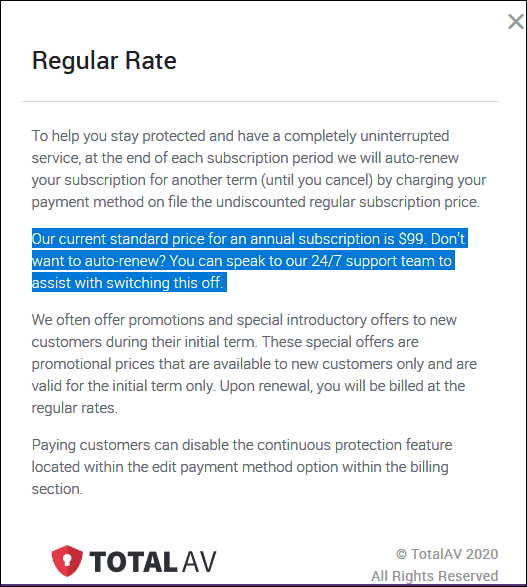
The only price shown on their site for “up to 3 computers” is $19 for one year. But nowhere on that page does it say that is only for the first year — after the first year, it’s $99 a year, and it auto-renews, and you get charged $99 automatically. This is from a hidden part of their page informing users they have to call TotalAV support to cancel the automatic charge… and you can almost imagine how that runaround will go.
“…Our current standard price for an annual subscription is $99. Don’t want to auto-renew? You can speak to our 24/7 support team to assist with switching this off…”
Finally, they promote TotalAV using reviews from TrustPilot, but can you trust TrustPilot?
See https://tinyurl.com/y82jfxvl and this https://tinyurl.com/yc9lcoku.
or search for “Can you trust TrustPilot?”
Comparing TotalAV to Emsisoft? There’s no comparison. Emsisoft is a trusted product and has protected our computers for many years. The pricing is upfront. Emsisoft does not rely on tricks or fake reviews.
Which would you rather have? I hope this helps you make the right decision.
More sage advice: Don’t rely on CNET. They are a known malware bundler and are also known to recommend products solely for financial compensation… earning commissions regardless of the quality of the product or the problems the products they recommend may cause users.

Now available: Reg Organizer 9.93
If you purchased or renewed Reg Organizer through Cloudeight within the last 12 months, you’re entitled to a free version upgrade to Reg Organizer 9.93. It works great with Windows 10 and Windows 11!
Save $14 on Reg Organizer right now!
Reg Organizer – A Swiss Army Knife of Windows Tools – Works Great on Windows 10 and 11!
Rose wants to know the best way to copy and transfer files from one computer to another
Hi TC and EB. I would like to know what is the best or a good way to transfer files from a pc to a laptop.
Thanks for all your help and advice. Rose
Our answer
Hi Rose. The best way to do it is to back up the files on an external hard drive. Then you can transfer the files to a new (or another) computer. If you don’t have an external drive, you can buy an external hard drive (1 terabyte) for $50 or less.
You can also use a cloud storage service like OneDrive if you have enough space. If you have enough space. For example, if you have MS Office installed, you get 1 TB of OneDrive space, which should be plenty for backing up/transferring files. And keep in mind that OneDrive files are accessible from all your devices, so you really wouldn’t have to copy/transfer them.
Either way, the easiest way to copy (transfer) files from one device to another is to back them up first, and then you can copy them anywhere.
If you have any more questions, just let us know.
Sandy wants to know how to stop Windows 11 File Explorer pop-ups when she has removable drives plugged in
I have a couple of USB items plugged into my USB ports. One is an external hard drive that I use to store my files. I have a couple of USB drives that I take my work back and forth with me as I work Hybrid, part in my office and part at home. I will be working, and all of a sudden File Explorer will pop up for one of the USB drives, sometimes both. Sometimes the external hard drive pops up in File Explorer. It pops up on top of my work while I’m typing away. What makes those drives just suddenly pop up with the contents of that drive in File Explorer?
Our answer
Hi Sandy. The reason File Explorer keeps popping up whenever you have removable drives plugged in is most likely because you have AutoPlay turned on.
But don’t worry, you can turn it off without affecting anything else. Here’s how to do it on Windows 11 (and Windows 10).
1. Open Settings (Hold down the Windows key & press the I key)
2. In the left pane, click on Bluetooth & Devices.
3. In the right pane, scroll down and click on AutoPlay.
4. Turn the switch to “Use AutoPlay for all media and devices” Off.
5. Close the Settings app.
We hope this helps you, Sandy.
Bil keeps getting fake McAfee messages
I am sure I’m not the only reader who is getting fake McAfee messages. When I Google it, I get the answer
“McAfee – Your PC is infected with 5 viruses!” is an online scam. It claims that users’ devices have been infected due to an outdated McAfee subscription. Usually, the goal of such scams is to trick users into installing or purchasing unreliable, nonoperational, harmful, or even malicious software. It must be emphasized that this scheme is not associated with the McAfee antivirus or McAfee Corp. Deceptive sites are typically entered inadvertently; most users access them via mistyped URLs or redirects caused by rogue webpages, intrusive ads, or installed PUAs (Potentially Unwanted Applications).”
I have installed uBlock Origin and Adblock Plus as extensions to Chrome and Microsoft Edge. I also installed Combo Cleaner on a 7-day trial. However, I still get the pop-ups. It looks like I will have to rebuild my PC, unless anyone has any further ideas. Regards Bil
Our answer
Hi Bil. You’ll be glad to know you’re one of many who have had this problem, and even more glad to know you won’t have to rebuild your PC to fix it. There is a simple fix that works 100% of the time: Reset your browser and clear your cache.
Here’s our tutorial on how to reset and clear the cache for Microsoft Edge, Google Chrome, and Mozilla Firefox.
After you reset your browser and clear its cache, it’s a good idea to restart your computer.
Keep in mind also that this is not a PUA or malware per se; it was something you clicked on — most likely in an email. It resides in your browser’s history or cache.
Not sure what UBlock Adblock is, but I think you mean uBlock Origin. If that’s right, you should keep that. But you definitely do not need Combo Cleaner… so we recommend you remove that.
We hope this helps you, Bil.
THANK YOU FOR HELPING US!
When you support us with a small gift, you help us continue our mission to keep you informed, separate the truth from the hyperbole, and help you stay safer online. Plus, our computer tips make your computer easier to use.
Did you know that we provide support to thousands of people? Every week we help dozens of people via email at no charge. The questions and answers you see in our newsletters are from the email answers and help we provide to everyone free of charge.
Thanks to your gifts, we do more than provide this free newsletter. We help you recognize online threats, fight for your online privacy, help you navigate the Web safely, provide suggestions for safe, free software and websites, and help you get more out of your PC.
Please help us keep up the good fight with a small gift.
Would you be interested in making an automatic monthly gift? Visit this page. Please help us keep on helping you… and help us keep you safe on the Web.
Susan has trouble with Firefox
Hi TC & Darcy… My current problem has to do with Firefox. When I get an email with a link I want to click on, instead of opening a new tab in my current Firefox, it opens a new browser and closes the current one. It never used to do that. What can I do to stop that and go back to the way it was? I sure don’t want to close my current browser and open a new one. I usually have several tabs open on my current browser and don’t want to close them. Thank you for your help. You always have a solution. Cheers, Susan.
Our answer
Hi Susan. I’m not aware of any changes in Firefox that would cause this. It may have been an extension you installed, one you installed that was bundled with a freeware program, or one you installed that auto-updated and changed your settings. If you reset Firefox, it will return Firefox to its default settings. If you want to try resetting Firefox, read our instructions on resetting Firefox here.
Good luck, Susan.
Elaine wants to know how to email us when she gets a new computer
Hi, my computer is quite old, and I don’t know how to find out how old it is. I will be getting a new one at some stage and will want my email program installed again. If this computer crashes, how do I email you about the new one, and do you just need my email address to come on to the new one and do whatever needs to be done? Thanks so much. Elaine M.
Our answer
Hi Elaine. Since you have an Outlook.com account, you can email us from any internet-connected device, including a brand-new computer. So, if you get a new computer with Windows 1 on it, it will come with Microsoft Edge (browser). You can open Edge and go to https://www.outlook.com/ and log into your Outlook.com account, and email us.
You can also contact us on your new computer by opening the Edge browser that comes with Windows 11 and using it to go to https://thundercloud.net/contact.htm and contact us from there. Just be sure to include your email address so we can reply to you.
This is a tip for everyone. One of the best things about having a Gmail or Outlook.com (or any webmail account) is that you don’t need Thunderbird, Outlook, or any other email program to send and receive emails.
While having an email client like OE Classic, Thunderbird, Outlook, etc. is more convenient for most people — since you can send and receive emails without opening a browser– if you have a webmail account and you get a new computer, you can open a browser and send and receive email even if you haven’t installed an email program yet.
We hope this helps you, Elaine.
Carol uses AbleWord and wants to know if it handles Excel files, too
I am so glad, thanks to you, that I won’t be forced to pay Microsoft to continue using MS Word. AbleWord is a great option. My question is: Will this also cover my Excel documents? Thanks so much for all your advice. It is much appreciated!
Our answer
Hi Carol. Thanks for your kind comments. AbleWord only replaces MS WORD; it does not replace Microsoft Office. To open Excel docs, you need to have MS Excel or an equivalent.
OpenOffice (www.openoffice.org) and Libre Office (www.libreoffice.org) are both complete office suites that replace Microsoft Office. Both Open Office and Libre Office offer alternative programs equivalent to MS Word, MS PowerPoint, MS Excel, and MS Access. There are other free office suites, too, including a newer one called ONLYOFFICE that we found excellent.
Don’t need any of our products or services right now?

Please help us to keep on helping you!
When you support us with a small gift, you help us continue our mission to keep you informed, separate the truth from the hyperbole, and help you stay safer online. Plus, our computer tips make your computer easier to use.
Did you know that we provide support to thousands of people? Every week we help dozens of people via email at no charge. The questions and answers you see in our newsletters are from the email answers and help we provide to everyone free of charge.
Thanks to your gifts, we do a lot more than provide this free newsletter. We help you recognize online threats, fight for your online privacy, provide the knowledge you need to navigate the Web safely, provide suggestions for safe, free software and websites, and help you get more out of your PC.
Please help us keep up the good fight with a small gift.
Are you interested in making an automatic monthly gift?
Visit this page. Help us keep helping you… and help you stay safe on the Web.
I’ve seen the ad for “Ninite.com” web site. Is this web site safe to use?
We don’t recommend using Ninite.
Ninite installs everything silently to default directories with zero user prompts. For users who like control over installations, shortcuts, and component features, that lack of transparency can be uncomfortable.
Anytime you route your software installations through a third-party website, you are placing trust in their infrastructure to securely handle those handshakes. Some software developers have asked to be removed from Ninite, or tools haven’t been updated promptly, leaving its catalog feeling a bit limited compared to direct downloads.