

VPNs: Brought to You By GOFF!
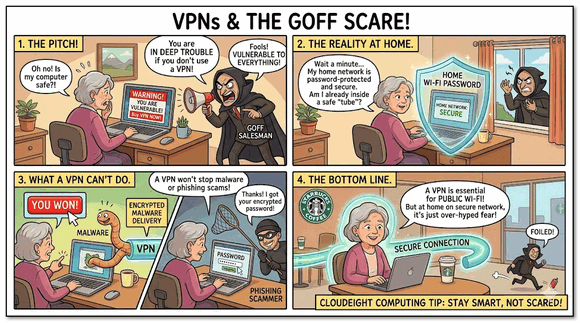
That’s right. VPNs are everywhere, and thanks to GOFF (Good Old-Fashioned Fearmongering), you’re in deep trouble if you don’t use one. WRONG!
Don’t misunderstand me here, VPNs do have a place, but that place is not for those who use their computers at home on their own Wi-Fi network or Ethernet to use social media, check email, browse the web, and watch videos.
The fearmongers have us convinced that if we don’t use a VPN, we are all fools because, without a VPN, we are vulnerable to:
Viruses
Trojans
All kinds of malware
Phishing attempts
Counterfeit websites
Boogeymen (AKA “Hackers”)
Identity theft
Tech Support Scams
Password theft
Thanks, fearmongers, for all the misinformation.
Now we’re going to set the record straight, so you won’t be a victim of fearmongering and throw away money or throttle your bandwidth using a VPN when you do not need one.
The Truth About VPNs
A VPN (Virtual Private Network) is not an antivirus program. It is not an identity theft shield. It is not a magic wand that stops you from making a mistake online.
A VPN has exactly one primary job: it encrypts the connection between your computer and the internet. Think of it like a secure, private extension tube. Anyone looking at your connection from the outside can only see the tube; they cannot see what is traveling inside it.
That sounds wonderful, doesn’t it? But here is what the GOFF salesmen won’t tell you: if your home network is already password-protected and secure, you are already inside a safe tube. Adding a VPN at home is like putting a second roof on your house just because it might rain. It doesn’t give you extra protection; it just makes things complicated!
The Cold, Hard Facts: What a VPN Cannot Do
Let’s bust the big myths circulating out there in internet-land. A VPN cannot protect you from the most common dangers on the web today:
It won’t stop malware or viruses: If you download a nasty file or a Trojan from a shady website, a VPN will happily and securely pass that virus right into your computer. It encrypts the delivery, but it doesn’t clean the package.
It won’t stop phishing or scams: If you get an email claiming to be from your bank and you click the link, a VPN won’t stop you. If you type your password into a counterfeit website, the VPN will encrypt your password as it sends it straight to the scammers!
It won’t stop tech support scams: A VPN cannot stop your phone from ringing when a scammer pretends to be from Microsoft, nor can it stop a scary pop-up from appearing if you stumble onto a bad page.
To stay safe from those things, you don’t need a VPN. You need a good antivirus, a secure browser, and a healthy dose of common sense!
So, When Do You Actually Need a VPN?
We aren’t saying VPNs are completely useless. They are actually fantastic tools—when used in the right place at the right time. There are three specific times you should use one:
When using Public Wi-Fi: If you take your laptop or phone to Starbucks, an airport, a hotel, or a doctor’s office, that public Wi-Fi network is totally open. Anyone sitting near you with the right software can snoop on your connection. This is when you turn on your VPN. It locks your connection down so the guy at the next table can’t see your business.
For Remote Work: Many employers require a specialized VPN so you can securely log into the office network from your couch at home.
To Bypass Regional Blocks: If you travel abroad and want to read your local hometown news, but that country blocks American websites, a VPN can make it look like you are still sitting back home in the USA, Great Britain, Australia, New Zealand, et.al.
Illegal activities online: If you’re planning on doing illegal things online, then you’ll need a VPN – although you should be aware that authorities can obtain your web activities from the logs most VPN providers claim they don’t keep, but do. Proceed at your own peril.
The Problem with Leaving a VPN On All the Time
Many browsers and software packages now offer “free” or built-in VPNs, like the Firefox VPN. They tempt you to just flip the switch and leave it running forever.
But as many folks find out the hard way, these built-in options can be incredibly finicky. They frequently clash with your computer’s default settings (like your DNS resolver), causing websites to suddenly stop loading or your internet to grind to a painful halt.
Worse yet, most of these free options come with a strict bandwidth limit—usually around 50 GB a month. While 50 GB is a mountain of data if you are just reading our newsletters and checking email, it disappears in the blink of an eye if you watch videos. High-Definition streaming on YouTube, Netflix, or Prime Video eats up about $3\text{ GB}$ of data every single hour!
If you leave that VPN running while watching a movie at home, you will smash through your monthly limit in days. The moment you do, the “free” software changes its tune, constantly coaxing, coercing, and nagging you with pop-ups to upgrade to its expensive, paid monthly subscription.
Don’t Let Goff Scare You!
Don’t let the fearmongers separate you from your money. If you are computing from the comfort of your own home on your secure network, you do not need a VPN. Save your money, use your knowledge, keep your antivirus updated, and be very careful what you click.
Additionally since the vpn uses varing ip addresses your bank may not believe it is you when you log in from New York and then 5 minutes later you log in from Chicago. Account will get locked down and getting it released is a nightmare. I speak from experience.
Very informative … thank you.